
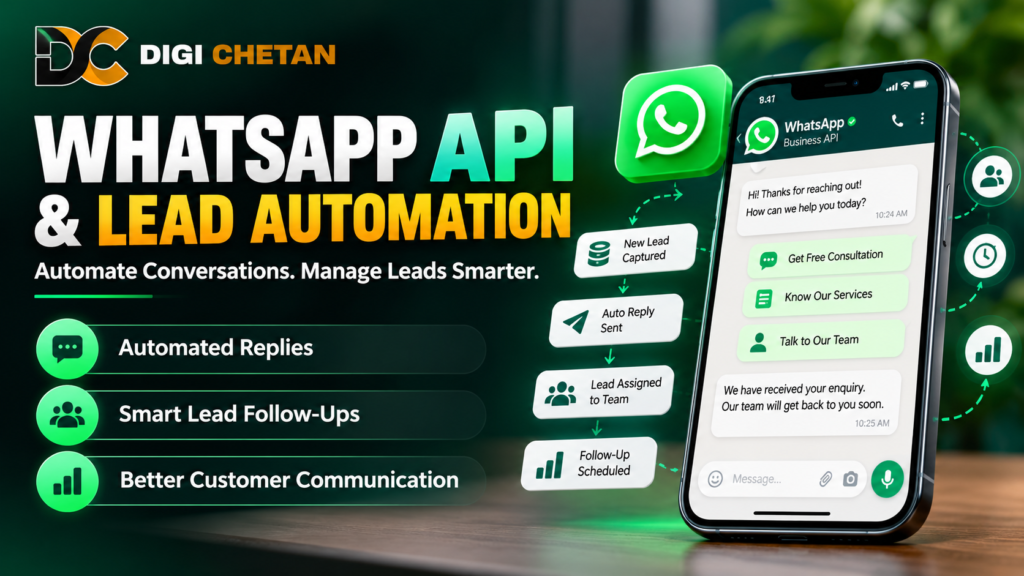
WhatsApp API and lead automation in Jabalpur can help businesses manage customer enquiries, respond more efficiently and organise their sales follow-up process.
From educational institutes and real estate companies to retailers, service providers and digital marketing agencies, businesses can use WhatsApp-based communication to improve the way they interact with potential customers.
Many businesses receive enquiries through websites, advertisements, social media and referrals. When these enquiries are handled manually, it can become difficult to respond consistently, remember follow-ups and keep track of potential customers.
WhatsApp automation can help streamline parts of this process. However, successful implementation requires more than connecting a messaging tool. Businesses need a clear communication strategy, appropriate automation workflows, customer consent and a reliable way to manage leads.
In this guide, we will explain how WhatsApp Business API works, how lead automation can support your sales process and what businesses should consider before implementing an automated messaging system.
What Is WhatsApp Business API?
WhatsApp Business Platform, commonly associated with the WhatsApp Business API, enables eligible businesses to integrate WhatsApp messaging with supported business systems, customer service tools and automation platforms.
Unlike the standard WhatsApp application, the platform is designed to support more structured business messaging and integrations. Depending on the provider and implementation, businesses may be able to connect messaging workflows with customer relationship management systems, lead management tools and customer support processes.
Businesses can use these capabilities to manage conversations at a larger scale, automate appropriate messages and help teams coordinate customer communication.
The exact features available depend on the implementation, provider, account setup and current WhatsApp policies.
WhatsApp Business App vs WhatsApp Business Platform
The WhatsApp Business App can be suitable for small businesses that handle conversations directly. It provides business-oriented features such as a business profile, quick replies and other messaging tools.
The WhatsApp Business Platform is designed for businesses that need integrations, structured workflows or more extensive messaging operations.
A simple comparison:
- WhatsApp Business App: Suitable for many small businesses managing conversations directly.
- WhatsApp Business Platform/API: Useful when a business needs supported integrations, automated workflows or team-based messaging.
- Third-party automation tools: May connect the platform with other systems, depending on the provider and approved capabilities.
Not every business needs an API integration. Choose a solution based on your enquiry volume, team requirements, budget and desired workflows.
What Is WhatsApp Lead Automation?
WhatsApp lead automation is the use of configured workflows to help manage communication with potential customers.
For example, when someone submits an enquiry form, an integrated system may record the lead and initiate an appropriate WhatsApp communication workflow, provided the necessary permissions, platform requirements and messaging rules are satisfied.
Automation can support tasks such as:
- Sending appropriate acknowledgement messages.
- Sharing requested information.
- Asking relevant qualification questions.
- Assigning enquiries to team members.
- Scheduling follow-up reminders.
- Sending appointment confirmations.
- Updating lead status in a connected system.
- Routing complex questions to a human representative.
Automation should make customer communication more organised, not make it less personal. Businesses should provide clear information, respect customer preferences and make human assistance available when needed.
Why Businesses Should Consider WhatsApp Lead Automation
1. Respond to Enquiries More Consistently
When a business receives multiple enquiries, manual responses can become difficult to manage.
An appropriately configured workflow can acknowledge an enquiry and explain what happens next. This helps customers understand that their message has been received.
For example, a training institute could send an acknowledgement when a prospective student requests course information. A team member could then provide details about the syllabus, schedule and enrolment process.
Automated acknowledgements should not promise that a human has reviewed a request if that has not happened.
2. Organise Incoming Leads
Enquiries may arrive from several sources, including website forms, advertising campaigns and social media.
With suitable integrations, businesses can bring lead information into a central system and organise enquiries by source, service, status or assigned team member.
This can make it easier to identify which enquiries need a response and which customers are waiting for further information.
Only collect information that is relevant to the business purpose, and handle customer data responsibly.
3. Reduce Missed Follow-Ups
A potential customer may not be ready to make a decision immediately. They might need a quotation, additional information or time to compare options.
A lead management workflow can create reminders or schedule appropriate follow-ups so that interested prospects are not forgotten.
For example, a real estate business could record when a customer requests information about a property and assign a follow-up task to the relevant sales representative.
Follow-ups should be relevant, appropriately timed and consistent with the customer’s communication preferences.
4. Improve Team Coordination
When several employees manage customer conversations, it can be difficult to understand who is responsible for each enquiry.
A connected system may help teams assign leads, record statuses and maintain a clearer view of the customer journey.
This can be particularly useful when a business needs to transfer an enquiry from an initial support representative to a salesperson or specialist.
The workflow should clearly identify responsibility for each lead instead of assuming that automation alone will resolve every enquiry.
5. Support Customer Service
Automation can handle routine interactions, such as sharing frequently requested information or providing appointment details.
However, it should not prevent customers from receiving human assistance when their questions are complicated, sensitive or outside the workflow.
A good system combines efficient automation with a clear handover process.
7 Practical WhatsApp Automation Workflows for Businesses
1. Automated Enquiry Acknowledgement
When a potential customer submits a form or initiates an eligible conversation, a workflow can acknowledge the enquiry and explain the next step.
For example:
“Thank you for contacting us. We have received your enquiry about our services. Our team will review your request and get back to you.”
Use wording that accurately reflects your actual process. Do not promise a response time unless your team can reliably meet it.
2. Lead Qualification
Some businesses need a little more information before assigning an enquiry to the appropriate team.
A workflow can ask a small number of relevant questions, such as which service the customer needs or whether they prefer a call or a message.
For example, a digital marketing agency could ask whether an enquiry relates to SEO, website design or paid advertising.
Keep questions concise and avoid collecting unnecessary personal information. Provide an option to speak with a person when the automated questions do not suit the customer’s needs.
3. Appointment Booking and Reminders
Businesses that operate through appointments may use connected systems to share booking details and send appropriate reminders.
This can be useful for consultations, demonstrations, service visits and educational sessions.
The system should reflect the actual appointment status and provide a way to correct or change booking details.
4. Course Enquiry Management
An educational institute may receive enquiries about courses, fees, class schedules and eligibility.
A structured workflow can provide approved course information, ask which programme interests the prospective student and direct more detailed questions to an admissions representative.
For example, AI Digital School could consider a workflow that organises course enquiries and helps staff respond consistently, provided the setup suits its operational needs.
Keep course information current and make sure prospective students can request clarification from a person.
5. Quotation and Service Enquiries
A service business can use WhatsApp to acknowledge quotation requests and share relevant next steps.
Depending on the business process, a connected system may record the service requested, assign the enquiry to a team member and remind the team to prepare a quotation.
Avoid automatically sending prices that have not been verified or making commitments the business cannot fulfil.
6. Customer Support and FAQs
Businesses often receive repeated questions about opening hours, service availability, delivery, payment methods or booking procedures.
A carefully maintained automated FAQ workflow can provide approved answers to common questions.
When the system cannot confidently answer a question, it should route the conversation to a suitable person rather than inventing information.
Review the answers regularly so that customers do not receive outdated details.
7. Follow-Up for Interested Leads
A customer may request information and then stop responding. A business may use a suitable follow-up workflow to provide a reminder or ask whether additional information is needed.
Before sending a follow-up, check the conversation history, customer preferences and applicable messaging requirements.
Do not repeatedly message people who have declined further communication. Respect opt-outs and use approved templates when required by the platform.
How to Build a WhatsApp Lead Automation System
A useful automation system starts with the business process rather than the tool.
Step 1: Map Your Current Enquiry Process
Identify where enquiries originate, who handles them and what usually happens after the first contact.
Document the common stages, such as new enquiry, qualification, quotation, follow-up and conversion.
This helps reveal where leads are being delayed or lost.
Step 2: Choose the Right WhatsApp Solution
Determine whether the WhatsApp Business App is sufficient or whether your business needs the WhatsApp Business Platform and an integration provider.
Consider the features you actually need, including team access, supported integrations, automation capabilities, reporting and expected message volume.
Review the provider’s pricing, implementation requirements, support arrangements and current platform compatibility before committing.
Step 3: Define the Automation Rules
Decide which events should trigger a workflow and what the system should do next.
For example:
- A new enquiry is received.
- The lead information is recorded.
- An appropriate acknowledgement is sent.
- The enquiry is assigned to a team member.
- A reminder is created if a follow-up is needed.
- The lead status is updated when the next step occurs.
Test the workflow with realistic scenarios before using it with customers.
Step 4: Prepare Message Templates
Write clear, helpful messages for the situations your business handles most frequently.
Depending on the platform’s current rules and the type of conversation, approved message templates may be required for business-initiated messages outside the permitted customer service window.
Make sure templates follow applicable WhatsApp policies and that the information they contain is accurate.
Avoid misleading claims, excessive promotional language and messages that are irrelevant to the recipient.
Step 5: Connect Your Lead Management System
If your business uses a CRM or another lead management tool, assess whether it can integrate with your WhatsApp solution.
The integration may help record lead details, assign responsibility, update statuses and coordinate follow-up tasks.
Check how information is stored, who can access it and how duplicate records or failed integrations will be handled.
Step 6: Test the Complete Customer Journey
Test what happens when a customer sends a message, submits a form, asks an unexpected question or requests human assistance.
Check whether messages are sent at the correct time, whether lead information is recorded accurately and whether opt-outs are respected.
Testing helps identify problems before they affect real customers.
Step 7: Monitor and Improve
Review performance using meaningful measures, such as response time, qualified enquiries, follow-up completion and lead-to-customer conversion.
Use customer feedback to identify confusing messages or unnecessary steps.
Automation should evolve with your business process rather than remain unchanged after launch.
How WhatsApp Automation Can Work With Google Ads and Meta Ads
Businesses may use advertising platforms to attract new enquiries and WhatsApp to continue the conversation.
For example, a business may run a campaign that encourages interested customers to contact it through WhatsApp. An appropriate workflow can then help organise incoming conversations and route enquiries to the right team.
The exact setup depends on the campaign format, WhatsApp integration and available platform features.
To evaluate this process, track the source of each lead where possible, measure the quality of enquiries and record which ones become customers.
Do not judge advertising performance solely by the number of WhatsApp conversations. Some conversations may be irrelevant or may not result in a sale.
Combining campaign reporting with lead management can provide a clearer picture of business outcomes.
What Does WhatsApp API and Lead Automation Cost?
There is no single price for every WhatsApp automation setup.
The total cost may depend on the WhatsApp solution, messaging charges, provider fees, software subscriptions, integrations, setup work and ongoing support.
Your requirements also affect the complexity of the implementation. A basic enquiry acknowledgement workflow may be simpler than a system that connects advertising, a CRM, appointment booking and multiple sales teams.
Before selecting a provider, ask for a clear breakdown of recurring fees, usage-based charges, setup costs and any additional integration costs.
Verify current WhatsApp pricing and provider terms directly before budgeting. Pricing and policies can change.
Choose a solution that fits your actual enquiry volume and business requirements instead of paying for features you do not need.
Common Mistakes to Avoid
Automating Everything
Not every customer interaction should be automated. Complex questions, complaints and situations requiring judgement often need a human response.
Ignoring Customer Consent
Businesses must follow applicable WhatsApp messaging policies and respect customer communication preferences. Obtain the required permissions and provide a clear way to stop unwanted messages.
Sending Too Many Messages
Frequent or irrelevant messages can frustrate customers and damage trust. Keep communication useful, timely and appropriate.
Using Unofficial or Unreliable Tools
Review whether your provider uses supported integration methods and complies with current platform requirements. Unauthorised tools may introduce operational, privacy or account risks.
Failing to Test Integrations
A workflow may fail if messages, lead records or status updates are not connected correctly. Test the complete process and establish a way to detect failures.
Ignoring Data Security
Limit access to customer information, collect only what is needed and review how your provider stores and processes data. Follow applicable privacy and data protection requirements.
Forgetting Human Handover
Customers should be able to get assistance when automation cannot resolve their needs. Define who receives escalated conversations and how those enquiries are handled.
How Digi Chetan Can Help Businesses Explore Lead Automation
Digi Chetan works in digital marketing and related digital solutions. Businesses considering WhatsApp-based lead automation can explore whether the available services match their enquiry management and customer communication requirements.
Before implementing a system, identify your biggest operational challenge. You may need faster enquiry acknowledgement, better follow-up organisation, a connection between advertising and lead records, or a clearer customer support process.
A well-planned workflow should solve a real problem, respect customer preferences and be measurable after implementation.
Looking to improve your business communication process? Visit the Digi Chetan website to explore available digital marketing and automation-related services, and contact the business through its published contact details to discuss your requirements.
Frequently Asked Questions
1. What is WhatsApp Business API?
The WhatsApp Business Platform, commonly called the WhatsApp Business API, enables eligible businesses to integrate WhatsApp messaging with supported software and business workflows. Its capabilities depend on the implementation and current platform rules.
2. What is WhatsApp lead automation?
WhatsApp lead automation uses configured workflows to acknowledge enquiries, collect relevant information, organise leads, create follow-up reminders and support customer communication.
3. Is WhatsApp Business API suitable for small businesses?
It can be useful for small businesses with sufficient enquiry volume or a need for integrations and team workflows. Businesses with simpler requirements may find the WhatsApp Business App sufficient.
4. Can WhatsApp automation generate leads?
Automation primarily helps manage communication and the handling of incoming enquiries. Advertising, website content, referrals and other marketing activities may generate the enquiries that an automation system then helps organise.
5. Can WhatsApp API connect with a CRM?
Supported integrations may connect WhatsApp messaging with a CRM or other lead management system. Available features depend on the platform, provider and implementation.
6. Can I send automated promotional messages to every contact?
No. Businesses must follow applicable messaging policies, consent requirements and customer preferences. Promotional messages should not be sent indiscriminately, and opt-outs should be respected.
7. Is WhatsApp lead automation expensive?
Costs vary by provider, messaging usage, integrations, software subscriptions and implementation complexity. Review the full pricing structure before selecting a solution.
8. How do I measure WhatsApp automation performance?
Track relevant measures such as response time, qualified enquiries, completed follow-ups, appointment bookings and lead-to-customer conversion. Choose metrics that reflect your actual business objectives.
Conclusion
WhatsApp API and lead automation can help businesses organise enquiries, improve response consistency and manage follow-ups more efficiently. However, effective automation requires a clear process, suitable tools, accurate information and responsible customer communication.
Start by identifying where enquiries are being delayed or missed. Choose an appropriate WhatsApp solution, build a small workflow, test it carefully and measure the results before expanding the system.
When automation supports a well-managed sales process, it can help your team spend less time on repetitive administrative tasks and more time assisting potential customers.